
Cron Expression Builder
Build cron expressions visually. See a human-readable description, next run times and copy the result.
What is a cron expression builder — and who needs one?
A cron expression builder lets you create cron job schedules visually — without memorizing the cron syntax. Cron expressions are five-field strings that define when a scheduled task should run. They are used in Linux servers, cloud platforms, CI/CD pipelines, WordPress, and virtually every backend system that runs recurring tasks.
The problem: cron syntax is notoriously hard to read and write from memory. This tool solves that — build your schedule visually, see the human-readable description instantly, and copy the expression directly into your system.
How to use this free cron expression builder
- Choose a quick preset — Every minute, Every 5 min, Every hour, Daily midnight, Daily 9 AM, Weekdays 9 AM, Weekly Sunday, Monthly 1st, or Yearly Jan 1
- Or build manually — set each field individually: Minute, Hour, Day of Month, Month, Day of Week
- See the live expression — the cron expression updates in real time at the top
- Read the description — a human-readable explanation appears below the builder
- Check the next 5 executions — exact dates and times are shown so you can verify the schedule is correct
- Copy — copy the expression with one click and paste it directly into your system
Cron expression syntax explained
A standard cron expression has 5 fields separated by spaces:
| Field | Allowed values | Example |
|---|---|---|
| Minute | 0–59 | 0 = at the start of the minute |
| Hour | 0–23 | 9 = 9 AM |
| Day of Month | 1–31 | 1 = first day of the month |
| Month | 1–12 | * = every month |
| Day of Week | 0–7 (0 and 7 = Sunday) | 1–5 = Monday to Friday |
Quick presets explained
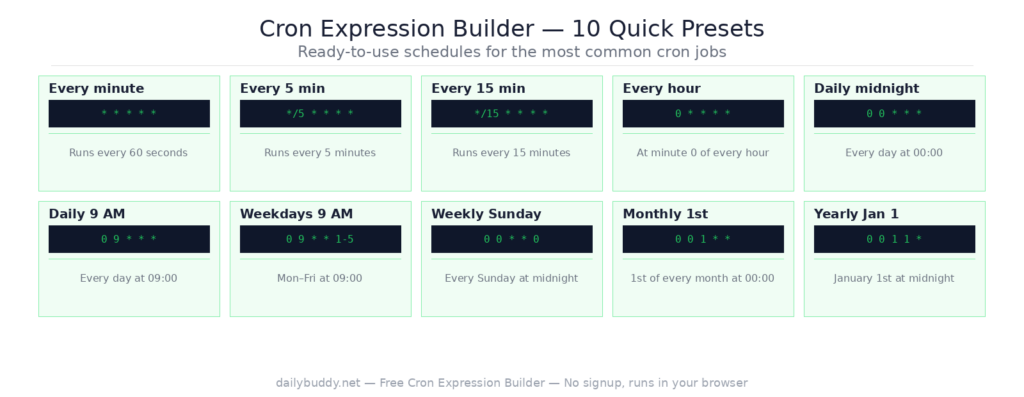
The tool includes 10 ready-to-use presets for the most common schedules:
* * * * * — Every minute*/5 * * * * — Every 5 minutes*/15 * * * * — Every 15 minutes0 * * * * — Every hour at minute 00 0 * * * — Daily midnight0 9 * * * — Daily 9 AM0 9 * * 1-5 — Weekdays 9 AM (Monday to Friday)0 0 * * 0 — Weekly Sunday at midnight0 0 1 * * — Monthly 1st at midnight0 0 1 1 * — Yearly Jan 1 at midnight
Common cron use cases
WordPress scheduled tasks (wp-cron) — WordPress uses cron expressions for scheduled posts, email digests, plugin tasks, and database cleanup. Build your expression here and paste it into your wp-config.php or plugin scheduler.
Server backups — schedule daily or weekly backups at off-peak hours. A typical daily backup at 2 AM: 0 2 * * *.
CI/CD pipelines — GitHub Actions, GitLab CI, and Jenkins all use cron syntax for scheduled pipeline runs. Build the expression visually and paste it directly into your workflow file.
Cloud functions and serverless — AWS Lambda, Google Cloud Scheduler, and Azure Functions all use cron expressions for triggered schedules.
Database maintenance — schedule regular cleanup, vacuum, or optimization tasks during low-traffic hours.
Email and notification jobs — send weekly digests, monthly reports, or daily summaries at exactly the right time.
Why "next 5 executions" matters
The most common mistake with cron expressions is writing a schedule that looks correct but runs at the wrong time — or never runs at all. A misplaced asterisk or an off-by-one error in the hour field can mean a job runs 24 times a day instead of once.
The next 5 executions panel shows you the exact dates and times your expression will trigger — before you deploy it. Verify the schedule is what you intended, then copy and paste.
Why this cron expression builder runs in your browser
This tool generates and evaluates all cron expressions locally in your browser. There is no server request — your expressions and schedule data never leave your device.
It’s the same approach DailyBuddy uses for its PDF tools, the JSON formatter, and the URL encoder decoder — no upload, no server processing, no data collection.
Frequently asked questions
Yes, completely free. No account required, no usage limits.
No. Everything runs locally in your browser. Your expressions never leave your device.
An asterisk means "every" — every minute, every hour, every day, and so on. It is the wildcard character in cron syntax.
Day of Month sets the job to run on a specific date (e.g. the 1st of every month). Day of Week sets it to run on a specific weekday (e.g. every Monday). Using both together means the job runs when either condition is met.
Yes. Use the Quick preset "Every 15 min" or set the Minute field to */15 manually.
Use the "Weekdays 9 AM" preset, or set Day of Week to 1-5 (Monday to Friday) manually.
Both 0 and 7 represent Sunday in standard cron syntax. Most systems accept either value.
Since no data ever leaves your browser, nothing is collected, stored, or processed. There is nothing to protect.