
Base64 Encoder / Decoder
Encode text or files to Base64, or decode Base64 back. Supports text, images and files.
What is a Base64 encoder decoder — and when do you need one?
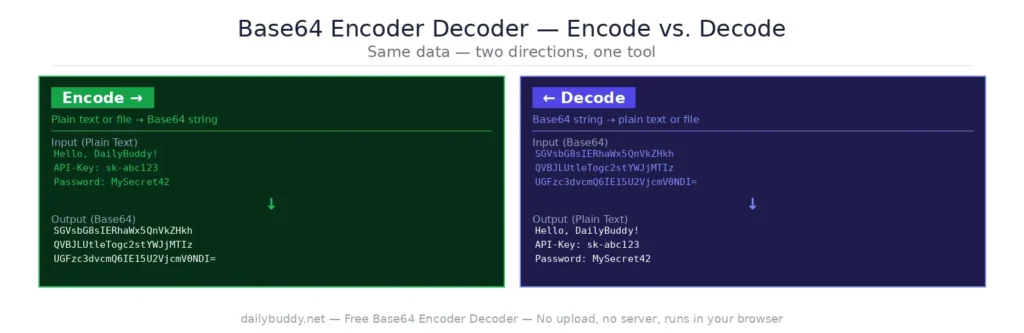
A Base64 encoder decoder converts text, images, and files into a Base64 string — or converts a Base64 string back to its original form. Base64 is a standard encoding scheme that represents binary data as plain ASCII text, making it safe to transmit through systems that only handle text.
Developers encounter Base64 constantly — in API authentication headers, data URIs for images, email attachments, JWT tokens, and config files. This tool handles all of it: encode any text or file to Base64, or decode any Base64 string back instantly.
How to use this free Base64 encoder decoder
To encode:
- Select the Encode tab
- Choose your input type — Text or File
- Enter your text or upload a file
- The output appears instantly in the right panel
- Copy the Base64 string with one click
To decode:
- Select the Decode tab
- Choose your input type — Text or File
- Paste your Base64 string or upload a Base64 file
- The decoded output appears instantly in the right panel
- Copy the result with one click
The swap button between input and output lets you flip the result back into the input field in one click.
What Base64 is used for
| Use case | Why Base64 is used |
|---|---|
| API authentication | Basic Auth encodes username:password as Base64 in the header |
| Data URIs | Embed images directly in HTML or CSS without a separate file |
| JWT tokens | The header and payload of a JWT are Base64-encoded |
| Email attachments | MIME encodes binary attachments as Base64 for safe transmission |
| Config files | Secrets and certificates are often stored as Base64 strings |
| Kubernetes secrets | All Kubernetes secret values are Base64-encoded |
When to use a Base64 encoder decoder
Decoding a JWT token — the header and payload of a JSON Web Token are Base64URL-encoded. Paste the payload section into the decoder to read the claims in plain text.
Creating a Basic Auth header — HTTP Basic Authentication requires the credentials in the format username:password encoded as Base64. Encode your credentials here and paste the result directly into your Authorization header.
Embedding images as data URIs — encode an image file to Base64 and use it as a data URI in HTML or CSS to avoid an extra HTTP request. Useful for small icons, inline SVGs, and email templates.
Reading Kubernetes secrets — kubectl outputs secret values as Base64. Paste the value into the decoder to read the actual secret without running a terminal command.
Encoding config values for CI/CD — environment variables, certificates, and API keys are often Base64-encoded in CI/CD pipelines. Encode and decode them here without touching the terminal.
Debugging API responses — some APIs return Base64-encoded fields in their responses. Decode them instantly to see the actual content.
Why this Base64 encoder decoder runs in your browser
Most Base64 tools process your input on a server. That means your passwords, API keys, certificates, JWT tokens, and any other sensitive data you encode or decode passes through someone else’s infrastructure.
This tool processes everything locally in your browser. Your input never leaves your device. There is no server request when you encode or decode — you can verify this yourself by opening the network tab in your browser’s developer tools.
It’s the same approach DailyBuddy uses for its PDF tools, the JSON formatter, and the passphrase generator — no upload, no server processing, no data collection.
Frequently asked questions
Yes, completely free. No account required, no usage limits.
No. Everything runs locally in your browser. Your text, files, and Base64 strings never leave your device.
Text input and file upload — both for encoding and decoding.
Yes. Switch the input type to File, upload your image or file, and the Base64 output is generated instantly.
Encoding converts plain text or binary data into a Base64 string. Decoding converts a Base64 string back to its original plain text or binary form.
Yes. Paste the Base64-encoded payload section of your JWT into the decoder to read the claims in plain text.
No. Base64 is encoding, not encryption. It is reversible by anyone without a key — it is used for safe data transmission, not security. Never use Base64 alone to protect sensitive data.
Since no data ever leaves your browser, nothing is collected, stored, or processed. There is nothing to protect.