
Image Compressor & Resizer
Compress and resize images in bulk. 100% browser-based — your images never leave your device.
What is an image compressor online — and why does file size matter?
An image compressor online reduces the file size of your images without visible quality loss. This tool runs entirely in your browser — no upload to any server, no signup required.
File size matters more than most people realise. Large images slow down websites, eat up storage, and make emails and file transfers unnecessarily heavy. A 3MB PNG on a landing page can add seconds to your load time. The same image compressed to 300KB loads ten times faster — and looks identical to the human eye.
This tool compresses and resizes JPG, PNG, and WebP files directly in your browser — in batch. Nothing leaves your device.
How to use this free image compressor online
The tool has two tabs — Compress and Resize. Both support multiple files at once.
Compress:
- Switch to the Compress tab
- Drop your images — JPG, PNG, and WebP supported, multiple files at once
- Set the quality level — adjust the slider to balance file size and quality
- Choose an output format — keep the original or convert to JPG, PNG, or WebP
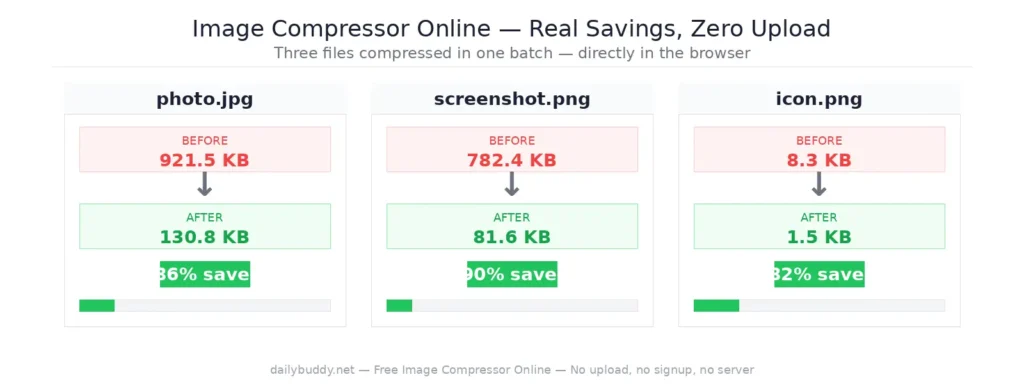
- Click Start — the tool shows before/after file size and savings per file
- Download — save files individually or all at once as a ZIP
Resize:
- Switch to the Resize tab
- Drop your images — multiple files supported
- Set width and height in px — the aspect ratio lock keeps proportions intact
- Choose an output format — original, JPG, PNG, or WebP
- Download — individually or as ZIP
What you can do with this tool
- Compress JPG, PNG, and WebP — reduce file sizes for web, email, and social media
- Batch process — compress or resize multiple files at once, download as ZIP
- Resize with aspect ratio lock — set exact pixel dimensions without distortion
- Track savings — see before/after file size and percentage saved per image
- Listenelement
When to use an image compressor online
Before uploading to WordPress or any CMS — large images slow down page load times and hurt your SEO. Google’s Core Web Vitals score is directly affected by image file sizes. Compressing before upload is the single easiest performance win.
Before sending by email — most email clients struggle with attachments over 5MB. A compressed image gets through faster and doesn’t fill up anyone’s inbox.
Before sharing on social media — platforms like Twitter, LinkedIn, and Instagram recompress your images automatically, often with poor results. Upload an already-optimised image to keep quality in your control.
For GitHub README files and documentation — large images in repos and docs slow down page rendering. Compressed images load instantly.
For client deliverables — sending a folder of 20MB screenshots to a client is avoidable. Compress first, then share via DailyBuddy Send.
Why "runs in your browser" matters
Most online image compressors upload your files to a server for processing. That means your images — which might contain unreleased designs, confidential screenshots, or client work — pass through someone else’s infrastructure.
This image compressor online processes everything locally using the browser’s built-in Canvas API. Your files never leave your device. There is no server request when you compress — you can verify this yourself by opening the network tab in your browser’s developer tools while using the tool.
It’s the same approach DailyBuddy uses for its PDF tools, the free passphrase generator, and the dark mode split image tool — no upload, no server processing, no file size limits.
Sharing compressed images with your team
Once you’ve compressed your images, you might need to send them to a client, a developer, or a designer — along with specs, source files, or other assets.
DailyBuddy Send lets you share files via an encrypted link with an optional expiration date. No cloud storage account needed, no files sitting in someone’s inbox forever. The link expires when you want it to.
Frequently Asked Questions About Image Compressor Online
Yes, completely free. No account required, no usage limits, no watermarks on compressed images.
No. Everything runs locally in your browser. Your images never leave your device.
JPG, PNG, and WebP are supported for upload. For the output you can keep the original format or convert to JPG, PNG, or WebP in the same step.
At moderate compression levels, the difference is not visible to the human eye. The tool shows you the before/after file size and savings per image so you can adjust the quality slider to your needs.
Yes. Both the Compress and Resize tabs support multiple files at once. Download all results as a ZIP with one click.
Compress and Resize are separate tabs. Run Compress first, then switch to Resize — or use whichever tab fits your need.
No. Since everything runs in your browser, there are no server-side file size restrictions.
Since no data ever leaves your browser, nothing is collected, stored, or processed. There is nothing to protect.