
Markdown to HTML Converter
Convert Markdown to HTML and back. Live preview, syntax highlighting and copy with one click.
What is a Markdown to HTML converter — and who uses one?
A Markdown to HTML converter transforms Markdown syntax into clean, ready-to-use HTML — or converts HTML back to Markdown. Markdown is the writing format used by developers, technical writers, and content creators everywhere: GitHub READMEs, documentation sites, blog posts, wikis, and chat tools all use it.
The problem arises when you need to move Markdown into a system that expects HTML — or vice versa. This tool converts in both directions, shows a live rendered preview, and lets you copy the result with one click.
How to use this free Markdown to HTML converter
Markdown → HTML:
- Select the Markdown → HTML tab
- Type or paste your Markdown into the input field
- The output updates instantly in the right panel
- Toggle between Preview and HTML — Preview shows the rendered result, HTML shows the raw code
- Copy the HTML output with one click
HTML → Markdown:
- Select the HTML → Markdown tab
- Paste your HTML into the input field
- The Markdown output appears instantly in the right panel
- Copy the result with one click
Markdown syntax quick reference
| Markdown | HTML output |
|---|---|
# Heading 1 |
<h1>Heading 1</h1> |
## Heading 2 |
<h2>Heading 2</h2> |
**bold text** |
<strong>bold text</strong> |
*italic text* |
<em>italic text</em> |
[link text](url) |
<a href="url">link text</a> |
 |
<img src="image.jpg" alt="alt"> |
- list item |
<ul><li>list item</li></ul> |
`inline code` |
<code>inline code</code> |
> blockquote |
<blockquote>blockquote</blockquote> |
When to use a Markdown to HTML converter
Writing content for a CMS or website — write in Markdown for speed and readability, then convert to HTML to paste directly into a WordPress block, a static site template, or any HTML-based CMS. If you need to collect structured content from others, DailyBuddy Forms lets you build GDPR-compliant forms on EU servers — no coding required.
GitHub README and documentation — Markdown is the native format for GitHub README files. Preview how your Markdown renders before pushing to your repo.
Email templates — write your email content in Markdown, convert to HTML, and paste the result into your email template or newsletter tool.
Converting legacy HTML to Markdown — old HTML content that needs to be migrated to a Markdown-based system can be converted in seconds with the HTML → Markdown direction.
Documentation and wikis — technical documentation is almost universally written in Markdown. Convert to HTML when you need to embed it in a web page or a custom documentation portal.
Blog posts and articles — write in Markdown with your preferred editor, convert to HTML, and paste directly into WordPress, Ghost, or any blog platform that accepts HTML input.
Preview vs. HTML output — what's the difference?
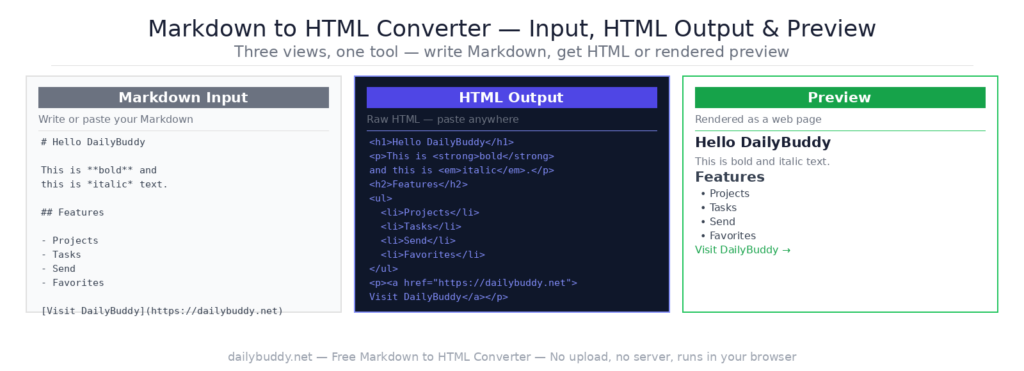
The output panel offers two display modes:
Preview — shows your Markdown rendered as a web page. Headings, bold text, links, images, and lists all appear as they would in a browser. Use this to check your content looks right before copying.
HTML — shows the raw HTML code generated from your Markdown. Copy this and paste it directly into any HTML file, CMS editor, or email template.
Why this Markdown to HTML converter runs in your browser
Most online converters process your content on a server. That means your documentation, blog posts, internal content, and any other text you convert passes through someone else’s infrastructure.
This tool converts everything locally in your browser. Your Markdown and HTML never leave your device. There is no server request — you can verify this by opening the network tab in your browser’s developer tools.
It’s the same approach DailyBuddy uses for its PDF tools, the JSON formatter, and the word counter — no upload, no server processing, no data collection.
Frequently asked questions
Yes, completely free. No account required, no usage limits.
No. Everything runs locally in your browser. Your Markdown and HTML never leave your device.
Yes. Switch to the HTML → Markdown tab, paste your HTML, and the Markdown output is generated instantly.
Standard Markdown including headings, bold, italic, links, images, lists, code blocks, blockquotes, and tables.
Preview shows your Markdown rendered as a web page. HTML shows the raw HTML code you can copy and paste into any system.
Yes. Write your README in Markdown, use Preview to check how it renders, then push the Markdown file directly to your repo.
Since no data ever leaves your browser, nothing is collected, stored, or processed. There is nothing to protect.