QR Code Generator
Generate QR codes from URL, text, WiFi, email, phone or SMS. Free, no sign-up required.
Design
What makes this free QR code generator different?
Most QR code generators online do one thing: turn a URL into a black-and-white square. This free QR code generator goes further — 9 content types, full design customisation, logo upload, and multiple size options. Everything runs in your browser. No signup, no server upload, no watermarks.
What types of QR codes can this free QR code generator create?
| Type | What it encodes |
|---|---|
| URL | Any website address — scan to open instantly |
| Text | Plain text, notes, codes, or any custom string |
| WiFi | Network name and password — scan to connect |
| Email address with optional subject and body | |
| Phone | Phone number — scan to call directly |
| SMS | Phone number with pre-filled message text |
| vCard | Full contact card — scan to save to contacts |
| Location | GPS coordinates or address — scan to open in maps |
| Event | Calendar event with title, date, and location |
What you can do with this tool
- Choose your QR type — select from URL, Text, WiFi, Email, Phone, SMS, vCard, Location, or Event
- Enter your content — fill in the relevant fields for your chosen type
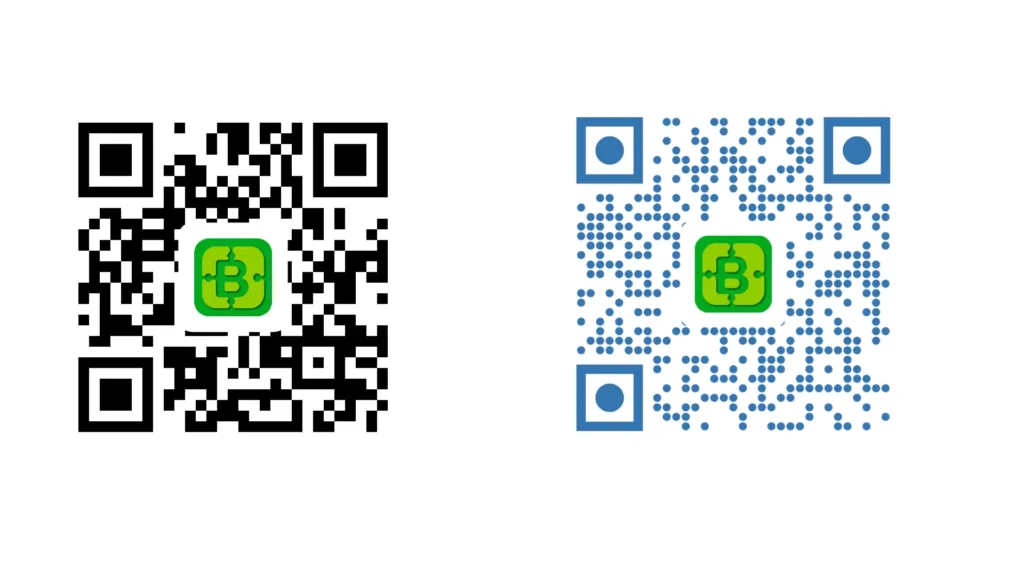
- Customise the design — set foreground and background colours, choose dot style, eye outer and eye inner shape, and optionally upload a logo to the centre
- Set the size — choose your output resolution in pixels
- Click Generate QR Code — your QR code appears instantly in the preview
- Download — save your QR code as PNG or SVG
Design options explained
This tool goes beyond basic black-and-white QR codes. You can fully customise the visual style:
- Foreground & background colour — match your brand colours or use any custom hex value
- Dot style — choose between square, rounded square, circle, or diamond dots
- Eye outer shape — the three corner squares that anchor the QR code, available in square, rounded, or circle style
- Eye inner shape — the inner marker inside each corner, available in square, rounded, or circle style
- Logo upload — place your logo or icon in the centre of the QR code for branded results
The design options let you create QR codes that fit your brand rather than generic black squares — without any external design tool.
Where to use your free QR code generator output
Business cards and print materials — link to your website, portfolio, or contact card. A vCard QR code lets anyone save your details to their phone with a single scan.
Restaurant and retail menus — a WiFi QR code on every table means guests connect instantly without asking for the password. A URL QR code on the menu links directly to your online ordering page.
Events and conferences — an Event QR code lets attendees add your session to their calendar. A Location QR code points them to the venue without typing an address.
Marketing and packaging — link print campaigns directly to landing pages, product demos, or discount codes. Track performance by pointing the QR code to a UTM-tagged URL.
Email signatures and presentations — a URL or vCard QR code in a slide deck or email footer makes it easy for anyone to follow up without typing a link.
Office and team use — share WiFi credentials, internal tools, or meeting room links with a QR code on the wall rather than sending yet another message in Slack.
Why this free QR code generator runs in your browser
Most QR code tools process your input on a server. That means your URLs, WiFi passwords, contact details, and location data pass through someone else’s infrastructure — often with tracking and ads attached.
This generator creates QR codes entirely in your browser using the HTML5 Canvas API. Your data never leaves your device. There is no server request when you click Generate — you can verify this yourself by opening the network tab in your browser’s developer tools.
It’s the same approach DailyBuddy uses for its PDF tools, the free passphrase generator, and the image compressor — no upload, no server processing, no data collection.
Sharing QR codes with your team
Once you’ve generated your QR code, you might need to send it to a designer, a print shop, or a client — along with brand assets, source files, or campaign materials.
DailyBuddy Send lets you share files via an encrypted link with an optional expiration date. No cloud storage account needed, no files sitting in someone’s inbox forever. The link expires when you want it to.
Frequently asked questions
Yes, completely free. No account required, no usage limits, no watermarks on generated QR codes.
No. Everything runs locally in your browser. Your URLs, passwords, contact details, and any other input never leave your device.
QR codes can be downloaded as PNG or SVG. SVG is recommended for print use as it scales without quality loss.
Yes. The design section includes a logo upload option that places your image in the centre of the QR code.
Yes. You can set custom foreground and background colours, and choose the style of the dots and corner markers independently.
Yes, as long as there is sufficient contrast between foreground and background. Avoid low-contrast colour combinations and keep the logo small enough not to obscure too much of the code.
URL, Text, WiFi, Email, Phone, SMS, vCard, Location, and Event — 9 types in total.
Since no data ever leaves your browser, nothing is collected, stored, or processed. There is nothing to protect.