Lorem Ipsum Generator
Generate placeholder text — paragraphs, sentences or words. Copy with one click.
What is a lorem ipsum generator — and who uses one?
A lorem ipsum generator creates placeholder text for designs, mockups, prototypes, and layouts — instantly, in any amount. Designers use it to fill text areas before real copy is ready. Developers use it to test typography, spacing, and responsive layouts without waiting for content.
This tool generates paragraphs, sentences, words, or list items — with optional HTML tags and the classic “Lorem ipsum…” opening. Word count and character count are shown for every result.
How to use this free lorem ipsum generator
- Set the amount — enter how many paragraphs, sentences, words, or list items you need
- Choose the type — Paragraphs, Sentences, Words, or List items
- Toggle options:
- Start with “Lorem ipsum…” — keeps the classic opening line
- Include HTML tags — wraps output in
<p>or<li>tags for direct use in HTML
- Click Generate — placeholder text appears instantly
- Check word and character count — shown below the output
- Copy — copy the full output to clipboard with one click
| Type | Best used for |
|---|---|
| Paragraphs | Blog layouts, article pages, content areas |
| Sentences | Captions, tooltips, short text blocks |
| Words | Labels, buttons, headings, navigation items |
| List items | Bullet lists, feature lists, menu items |
Where designers and developers use a lorem ipsum generator
UI and UX design mockups — placeholder text fills layouts before real copy exists. Using a lorem ipsum generator keeps the focus on layout, spacing, and hierarchy rather than content.
WordPress theme and template development — test how your theme handles different text lengths, heading sizes, and paragraph spacing before any real content is added.
Email template testing — fill email templates with realistic-looking placeholder text to test line lengths, font rendering, and mobile breakpoints before sending a test.
Presentations and slide decks — placeholder text in a slide deck helps clients visualize the layout without being distracted by draft copy.
Component libraries and Storybook — UI components need realistic text to look right in isolation. A few sentences or a paragraph fills cards, modals, and list items accurately.
Client presentations and wireframes — showing a client a wireframe with real-looking placeholder text looks more professional than empty boxes labeled “text here.”
What does "Include HTML tags" do?
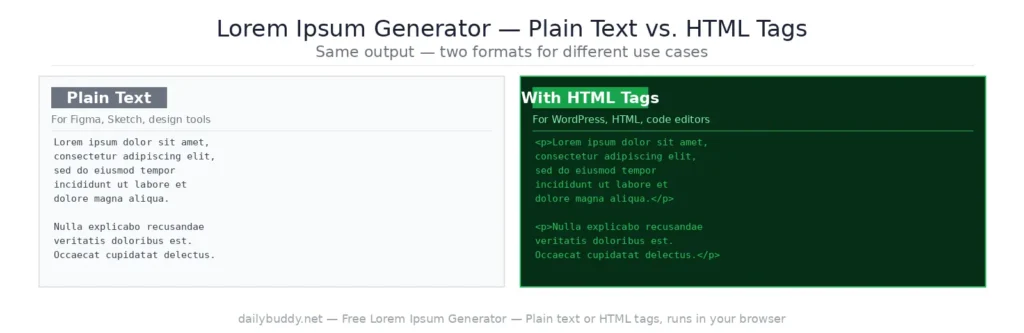
When this option is checked, the output wraps each paragraph in <p> tags or each list item in <li> tags. This means you can paste the output directly into an HTML file or a WordPress editor in code view — no manual tagging needed.
Without HTML tags, the output is plain text — useful for design tools like Figma, Sketch, or any tool that doesn’t need markup.
Why this lorem ipsum generator runs in your browser
This tool generates all placeholder text locally in your browser. There is no server request when you click Generate — your settings and generated text never leave your device.
It’s the same approach DailyBuddy uses for its PDF tools, the JSON formatter, and the word counter — no upload, no server processing, no data collection.
Frequently asked questions
Yes, completely free. No account required, no usage limits.
Paragraphs, sentences, words, and list items — choose whichever fits your layout.
Yes. Check the "Start with Lorem ipsum..." option and the classic opening line will always appear first.
Yes. Check "Include HTML tags" and each paragraph is wrapped in <p> tags, or each list item in <li> tags — ready to paste directly into HTML.
The word count and character count are displayed below the output after every generation.
Yes. Set the type to Words and the amount to however many words you need.
Since no data ever leaves your browser, nothing is collected, stored, or processed. There is nothing to protect.