
SEO Keyphrase Checker
Analyze any page for a keyphrase. Get a traffic-light score with actionable tips — like Yoast, but free.
SEO Score
What is an SEO keyphrase checker — and why do you need one?
An SEO keyphrase checker analyzes any webpage for a focus keyphrase and returns an actionable score with specific fixes. Enter a URL and a keyphrase — the tool tells you exactly what’s working, what needs improvement, and what’s broken.
Most SEO plugins like Yoast only work inside WordPress. This tool works on any URL — your own pages, competitor pages, or any site you want to analyze. No plugin, no CMS access, no signup required.
What this free SEO keyphrase checker analyzes
The tool checks two layers — keyphrase optimization and technical SEO.
Keyphrase checks:
- Keyphrase in Title — does your focus keyphrase appear in the page title?
- Keyphrase in URL — is the keyphrase reflected in the slug?
- Keyphrase in H1 — does the main heading contain the keyphrase?
- Keyphrase density — how often does the keyphrase appear in the content?
- Keyphrase in Meta Description — is the keyphrase in the meta description?
- Keyphrase in subheadings — does at least one H2 contain the keyphrase?
- Keyphrase in introduction — does the keyphrase appear in the first ~300 characters?
- Image alt attributes — do images have alt text containing the keyphrase?
Technical SEO checks:
- Title length — is the title within the ideal character range for search results?
- Meta description length — is the meta description the right length for snippets?
- Content length — does the page have sufficient word count for ranking?
- Internal links — how many internal links does the page have?
- External links — are there authoritative outbound links?
- Open Graph tags — are OG title, description and image set for social sharing?
- Schema.org (JSON-LD) — is structured data present for rich snippets?
- Canonical URL — is the canonical tag set correctly?
- Indexability — is the page set to be indexed by search engines?
- HTTPS — is the page served over a secure connection?
- Mobile viewport — is the viewport meta tag set correctly?
- Hreflang — are international language targeting tags present?
- Server response time — how fast does the server respond?
How to use this SEO keyphrase checker
- Enter the URL you want to analyze
- Enter your focus keyphrase — the keyword you want the page to rank for
- Click Analyze — the tool fetches the page and runs all checks
- Review your SEO score — results are color-coded: green is good, orange needs work, red is a problem
- Fix the issues — each check includes a specific explanation of what’s wrong and how to fix it
How to read your SEO score
The score runs from 0 to 100. Each check contributes points based on importance:
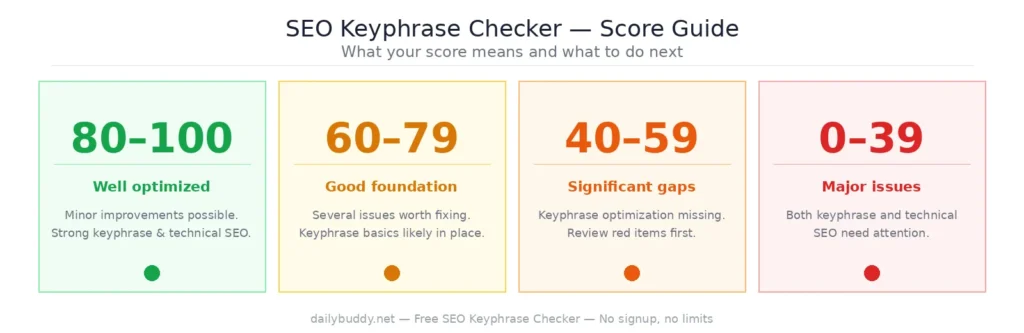
- 80–100 — well optimized, minor improvements possible
- 60–79 — good foundation, several issues worth fixing
- 40–59 — significant gaps, keyphrase optimization likely missing
- Below 40 — major issues with both keyphrase and technical SEO
The score is a guide, not a guarantee. A page with a high score is well-structured for search engines — but ranking also depends on backlinks, domain authority, and competition for the keyphrase.
When to use an SEO keyphrase checker
Before publishing a new page — run the check before you hit publish. Fix the red and orange items first. A few minutes of optimization before launch is worth more than fixing it after indexing.
When a page isn’t ranking — if a page has been live for months and isn’t showing up in search results, a keyphrase check often reveals the reason. Missing keyphrase in H1, wrong slug, or no internal links are common culprits.
For competitor analysis — enter any competitor URL with a keyphrase they’re ranking for. See exactly how they’ve optimized their page and what you need to match or beat.
After a site redesign — redesigns often break SEO. Check your most important pages after any structural change. If you’re running WordPress, the DailyBuddy WordPress Plugin can help you manage maintenance mode, custom login URLs, and media folders during the transition.
For content audits — run your existing pages through the checker regularly. Content that was well-optimized a year ago may need updating as best practices evolve.
SEO keyphrase checker vs. Yoast
| Yoast SEO | DailyBuddy SEO Checker | |
|---|---|---|
| Works on any URL | ✘ | ✔ |
| WordPress required | ✔ Required | ✘ Not needed |
| Competitor analysis | ✘ | ✔ |
| Technical SEO checks | Partial | ✔ Full audit |
| Schema.org check | ✔ | ✔ |
| Hreflang check | ✘ | ✔ |
| Server response time | ✘ | ✔ |
| Signup required | ✔ | ✘ None |
| Cost | Free / €99 per year | Free forever |
Frequently asked questions
Yes, completely free. No account required, no usage limits.
Yes. Enter any publicly accessible URL and it will be analyzed. The tool works on WordPress, Webflow, Shopify, static sites, and any other platform.
Yes. Enter any competitor URL with the keyphrase you want to rank for. The tool shows you exactly how their page is optimized.
Each check carries a weighted score based on its importance for ranking. Keyphrase in title and H1 carry more weight than, for example, hreflang tags.
The most common reasons are: keyphrase not in the title or H1, low keyphrase density, missing meta description, or no internal links. Check the red items first — they have the biggest impact.
It covers similar keyphrase checks plus additional technical audits that Yoast doesn't include — and it works on any URL, not just inside WordPress.
No. Analyze as many pages as you need, as often as you like.