
Color Palette Generator
Generate beautiful color palettes. Pick a harmony, lock colors, copy HEX/RGB/HSL and export as CSS or Tailwind.
Press Space to generate a new palette
What is a color palette generator — and why use one?
A color palette generator creates harmonious color combinations from a base color or at random. Instead of picking colors manually and hoping they work together, you let color theory do the work — and get HEX, RGB, and HSL values ready to copy straight into your project.
This tool goes beyond basic palette generation. You can lock individual colors, edit them manually, and export the entire palette directly as CSS variables, Tailwind config, SCSS, or JSON. No design software needed.
How to use this free color palette generator
- Choose a harmony — Random, Complementary, Analogous, Triadic, and more
- Set the number of colors — choose how many colors your palette should contain
- Pick a base color — use the color picker or enter a HEX value
- Click Generate — or press Space for a new palette instantly
- Lock colors you want to keep — click the lock icon on any color to fix it in place
- Edit individual colors — click the edit icon to fine-tune any color manually
- Copy individual values — HEX, RGB, and HSL are shown for every color
- Export the full palette — choose CSS, Tailwind, SCSS, or JSON and copy with one click
Color harmony types explained
Color harmony is the science of which colors look good together — based on the relationships defined in the color theory color wheel. Here’s what each harmony mode does:
| Harmony | Best used for |
|---|---|
| Random | Quick exploration, unexpected combinations |
| Complementary | High contrast, bold UI accents |
| Analogous | Natural, cohesive brand palettes |
| Triadic | Vibrant, balanced three-color systems |
| Split-complementary | Contrast with more harmony than complementary |
| Tetradic | Rich four-color palettes for complex UIs |
Export formats explained
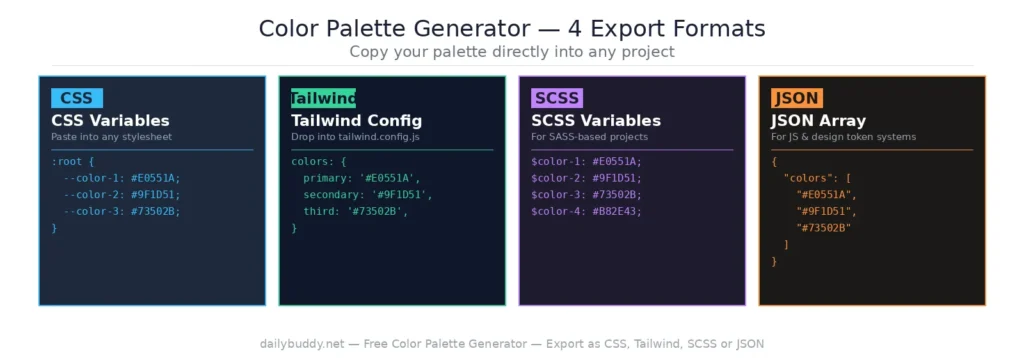
Once your palette is ready, export it directly into your project:
- CSS — exports as
:rootCSS variables (--color-1,--color-2etc.) ready to paste into any stylesheet - Tailwind — exports as a Tailwind CSS config object, ready to drop into
tailwind.config.js - SCSS — exports as SCSS variables (
$color-1,$color-2etc.) for SASS-based projects - JSON — exports as a JSON array for use in any JavaScript project or design token system
Each format is generated instantly and copied to your clipboard with one click.
Where to use a color palette generator
Brand identity and logo design — start with your brand’s primary color and generate a full palette around it. Lock the primary color and hit Generate until the supporting colors feel right.
Web and app UI design — consistent color systems are the foundation of good UI. Export directly to CSS variables or Tailwind and use them across your entire project.
Presentation and slide decks — a cohesive color palette makes any presentation look more professional. Generate a 4–5 color palette and stick to it throughout your slides.
Social media graphics — consistent colors across posts build brand recognition. Generate a palette once and reuse it in every graphic.
WordPress themes and templates — pick your accent and text colors in the generator, then copy the HEX values directly into your theme customizer or Elementor settings.
Why this color palette generator runs in your browser
This tool generates and processes all colors locally in your browser. There is no server request when you click Generate — your color choices, custom values, and exported code never leave your device.
It’s the same approach DailyBuddy uses for its PDF tools, the free QR code generator, and the image compressor — no upload, no server processing, no data collection.
Frequently asked questions
Yes, completely free. No account required, no usage limits.
Yes. Click the lock icon on any color to fix it in place. Clicking Generate or pressing Space will only regenerate the unlocked colors.
Yes. Click the edit icon on any color to change it manually using a color picker or HEX input.
CSS variables, Tailwind config, SCSS variables, and JSON. Each format is generated instantly and copied with one click.
Yes. The Tailwind export generates a config-ready color object you can paste directly into your tailwind.config.js file
You can set the number of colors in the palette before generating. The tool supports palettes of varying sizes.
very color is shown with its HEX, RGB, and HSL values — all copyable individually.
Since no data ever leaves your browser, nothing is collected, stored, or processed. There is nothing to protect.