URL Encoder / Decoder
Encode or decode URLs and query strings. Supports full URL, component and Base64URL encoding.
What is a URL encoder decoder — and when do you need one?
A URL encoder decoder converts special characters in URLs and query strings into a format that can be safely transmitted over the internet — or decodes them back to plain text. URLs can only contain a limited set of characters. Everything else — spaces, umlauts, special symbols, slashes in query values — must be percent-encoded before it can be used in a URL.
This tool supports three encoding methods: encodeURIComponent, encodeURI, and Base64URL — covering every URL encoding scenario a developer encounters.
How to use this free URL encoder decoder
To encode:
- Select the Encode tab
- Choose your method — encodeURIComponent, encodeURI, or Base64URL
- Enter your text or URL in the input field
- The encoded output appears instantly in the right panel
- Copy the result with one click
To decode:
- Select the Decode tab
- Choose your method
- Paste your encoded URL or string in the input field
- The decoded output appears instantly in the right panel
- Copy the result with one click
The swap button between input and output lets you flip the result back into the input field in one click.
Encoding methods explained
| Method | What it encodes | Best used for |
|---|---|---|
| encodeURIComponent | Everything except A-Z, 0-9, - _ . ! ~ * ' ( ) | Query string values, form parameters |
| encodeURI | Everything except valid URL characters and : / ? # [ ] @ ! $ & ' ( ) * + , ; = | Full URLs that need to stay valid |
| Base64URL | Entire string to Base64, URL-safe variant | JWT tokens, OAuth parameters, API tokens |
When to use a URL encoder decoder
Building query strings manually — when constructing a URL with query parameters in code, any value that contains spaces, ampersands, equals signs, or non-ASCII characters must be encoded. encodeURIComponent is the right method for individual parameter values.
Debugging encoded URLs — encoded URLs are hard to read. Paste a URL like https://example.com/search?q=hello%20world%26more into the decoder and instantly see the original query in plain text.
Working with redirect parameters — redirect URLs passed as query parameters must be encoded to avoid breaking the outer URL structure. Encode the redirect target here before appending it.
Handling international characters — URLs cannot contain spaces or non-ASCII characters like umlauts, accented letters, or Chinese characters. Encode them to their percent-encoded equivalents for safe use in any URL.
Working with JWT and OAuth — JWT tokens and OAuth authorization codes are Base64URL-encoded. Use the Base64URL method to encode or decode them without installing anything.
Decoding API responses — some APIs return encoded URLs or redirect targets in their responses. Decode them here to see the actual destination or parameter values.
encodeURIComponent vs. encodeURI — which one to use?
This is the most common point of confusion with URL encoding. The short answer:
- Use
encodeURIComponentfor individual query parameter values — it encodes everything including/,?,&, and= UseencodeURIfor complete URLs — it leaves the structural characters intact so the URL remains valid
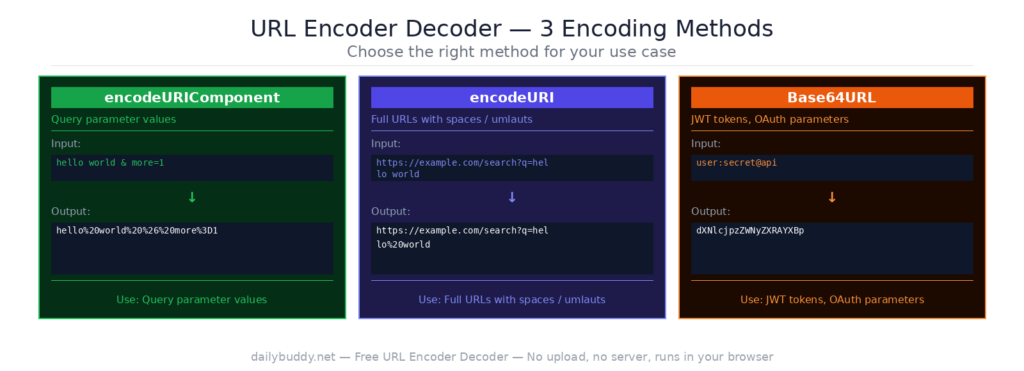
Example: if you want to pass a URL as a query parameter value, use encodeURIComponent. If you want to encode a full URL that has spaces or umlauts but must stay structurally valid, use encodeURI.
Why this URL encoder decoder runs in your browser
Most URL encoding tools are simple enough to run client-side — but some still send your input through a server. That means URLs containing API keys, authentication tokens, redirect targets, or sensitive query parameters could be logged or stored.
This tool processes everything locally in your browser via the JavaScript encoding API. Your input never leaves your device. There is no server request — you can verify this by opening the network tab in your browser’s developer tools.
It’s the same approach DailyBuddy uses for its PDF tools, the Base64 encoder decoder, and the JSON formatter — no upload, no server processing, no data collection.
Frequently asked questions
Yes, completely free. No account required, no usage limits.
No. Everything runs locally in your browser. Your URLs and query strings never leave your device.
encodeURIComponent encodes everything except basic alphanumeric characters and a few symbols — use it for individual query parameter values. encodeURI leaves structural URL characters intact — use it for full URLs.
Base64URL is a variant of Base64 that uses URL-safe characters instead of + and /. It is used in JWT tokens, OAuth parameters, and other contexts where the encoded string must be safe to use in a URL.
Yes. Paste the encoded string, decode it, then swap the output back to input and decode again until you reach the original value.
It may have been encoded multiple times. Use the swap button to decode the output again, or check which encoding method was used.
Since no data ever leaves your browser, nothing is collected, stored, or processed. There is nothing to protect.